Functional Profiles



A Functional Profile describes a set of related functionalities provided by a Product. It thereby focuses entirely on the functionality. Any transport-specific details are not part of the functional profile (e.g. on how to get or set a Data Point on a specific product).
The main intent is to allow communicator manufacturers to easily implement their use cases based on logically grouped Data Points, while device-specific communication details are handled SmartGridread Communication Handler library.
Any Product that supports the Functional Profiles required for a specific use case is therefore automatically compatible and can be used without changing the Communicator implementation.
The Functional Profiles build the foundation of the SmartGridready specification and allow access to any SmartGridready compliant Product through a generic API.
The SmartGridready library lists the currently available Functional Profiles: See Functional Profile Library
This list of Functional Profile definitions is subject to change and will grow in the future, as new Functional Profiles will be added.
As a Product supplier you need check which Functional Profiles suit your Product’s functionalities and add the matching Functional Profiles to the External Interface Definition file.
Functional Profile Structure
Fig. 3 shows the basic structure of a Functional Profile
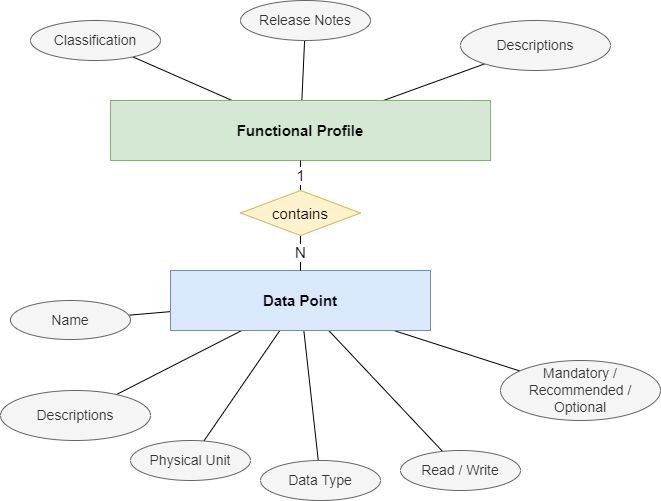
Fig. 3 Functional Profile Structure
A Functional Profile is part of a Product description and includes the:
Definition of the Functional Profile with identification and description.
Data Points defining access points to measure and control data on the Product.
Example:
PRODUCT
├── DEFINITION (Generic product info ...)
│
├── FUNCTIONAL-PROFILE (ActiveEnergyAC)
│   ├── DATAPOINT (ActiveEnergyACTot)
│   ├── DATAPOINT (ActiveEnergyACTot)
│   ├── DATAPOINT (ActiveEnergyACL1)
│   ├── DATAPOINT (ActiveEnergyACL3)
│   └── DATAPOINT (ActiveEnergyACL3)
│
└──FUNCTIONAL-PROFILE (ActivePowerAC)
    ├── DATAPOINT (ActivePowerACTot)
    ├── DATAPOINT (ActivePowerACL1)
    ├── DATAPOINT (ActivePowerACL3)
    └── DATAPOINT (ActivePowerACL3)
The illustration above shows a sample for the structure of a Product description file in XML (EID). The Product description exposes its functionalities by including two Functional Profiles. The example shows a simple Smart Meter that exposes AC-energy metering and AC-power measurement functionalities.
A Communicator software can read from or write to the device by addressing the Data Point by Functional Profile name and Data Point name. Java code example:
var acPowerTotal = meteringDevice.getVal("ActiveEnergyAC", "ActiveEnergyACTot");
A functional profile is defined/identified by:
Functional Profile Category: see Functional Profile Category
Functional Profile Type: see: Functional Profile Type
Level Of Operation: see Level of Operation
Version Number: see Versioning Scheme
Functional Profile Category
The Functional Profile Category is related the type of a Product and its functionalities.
The list below shows the currently published Functional Profile Categories (follow the links for a detailed description):
Category |
Assigned to Functional Profiles used with Products of type: |
Details page |
|---|---|---|
Actuator |
Used with actuator Products. Examples for actuator devices are electrical relays, servo motors etc. |
|
Battery |
Used with battery Products, e.g. batteries that store electrical energy produced by a PVA. |
|
BatterySystem |
Used with combined systems that consist of a battery and an Inverter |
|
DeviceInformation |
Has no predefined Data Points. Used to provide device information and add manufacturer proprietary Data Points. |
|
DynamicTariff |
Used to query dynamic tariff information from a power grid operator system. |
|
EVSE |
Used for Electrical Vehicle Supply Equipment (EVSE) Products like charging stations. |
|
HeatingCircuit |
Used with Products that allow reading information from a heating circuit, such as temperature. |
|
HeatPumpControl |
Used with Products that allow controlling heat pumps and reading information from heat pumps. |
|
Inverter |
Used with Products that allow controlling and reading status from PV-Inverter devices |
Inverter and Battery System devices. |
Metering |
Used with Products that provide metering an measurement functionalities like electrical power or energy consumption, for example smart meter devices. |
|
SGCP |
||
Sensor |
Used with Products that allow reading data from sensor devices, for example a humidity sensor. |
Functional Profile Type
The Functional Profile Type defines the set of functionalities provided by a Functional Profile. Functional Profiles of a given type can appear in multiple Functional Profile Categories. For example, the EnergyMonitor Functional Profile Type may be implemented by devices in the Heatpump Controls, Battery, and Battery System categories.
Even if a Functional Profile Type defines a distinct set of functionalities the the functional profile can come in different flavours defined by the Functional Profile Category and Level of Operation.
Therefore a Functional Profile is uniquely defined by:
Functional Profile Category: see Functional Profile Category
Functional Profile Type: see: Functional Profile Type
Level Of Operation: see Level of Operation
Version Number: see Versioning Scheme
Description |
Used with Functional Profile Category |
|
|---|---|---|
ActiveEnergyAC |
Provides AC energy metering Data Points for single phase, multi phase and total energy consumption. |
|
ActiveEnergyBalanceAC |
Provides energy balance metering Data Points providing data for imported, exported and net energy towards the power grid. |
|
ActivePowerAC |
Provides AC power measurement for single phase, multi phase and total power consumption. |
|
ApparentEnergyAC |
Provides Data Points for AC apparent energy metering. Supports single phase, multi phase and total apparent energy metering. |
|
ApparentPowerAC |
Provides Data Points for AC apparent power measurement. Supports single phase, multi phase and total apparent power measurements. |
|
BufferStorageCtrl |
This Functional Profile type extends the HeatPumpBase Functional Profile type. It provides Data Points to read temperature from and control heat pump buffer storage devices. |
|
CurrentAC |
Provides Data Points for AC current measurements. Supports single phase, multi phase and current against the neutral conductor measurements. |
|
CurrentDC |
Defines a single Data Point to measure DC current. |
|
DeviceInformation |
Empty functional profile without data points that can be used for vendor specific information and data points. It allows the handling of data points, which are valid for the whole device. |
|
DomHotWaterCtrl |
This Functional Profile type extends the HeatPumpBase Functional Profile. It provides Data Points that are available for controlling a domestic hot water circuit. |
|
EMS_Current_Limit |
This Functional Profile type enables a controller to set a current limitation for a charging station (Electric Vehicle Supply Equipment, EVSE). |
|
ESVEState |
Functional Profile for reading the status of the connector of an electric vehicle charging station (EVSE). |
|
EnergyMonitor |
Functional Profile that supports Data Points to read operating data such as energy consumption from a Product. |
|
FlexMgmt |
Functional Profile for Energy Management Systems (term:EMS)that expose an interface towards the power grid operator (:term:DSO) to control or specify limits on power consumption from the power grid and limits for energy feed-in to the power grid. |
|
Frequency |
Defines a single Data Point to measure AC frequency. |
|
HeatCoolCtrl |
This Functional Profile type extends the HeatPumpBase Functional Profile. It provides Data Points that are available for controlling a heat pump heating and cooling circuit. |
|
HeatPumpBase |
This is the basic Functional Profile for heat pumps. It allows operation mode control and reading operation status and measure temperature etc. |
|
Humidity |
Defines a single Data Point to measure humidity. |
|
LoadReduction_EVSE |
Functional Profile type to control load reduction of Electrical Vehicle Supply Equipement EVSE. |
|
PowerCtrl |
Functional Profile type to control the power consumption of heat pumps by controlling parameters like compressor power consumption or compressor rotations per minute. |
|
PowerFactor |
Provides Data Points to read the power factor defined as:
\[PowerFactor = \frac{ActivePower}{ApparentPower}\]
It supports single phase, multi phase and overall measurement. |
|
Recative Power AC |
Functional Profile Type to measure the reactive power. Supports single phase and multiphase reactive power measurement. |
|
SG-ReadyStates |
Functional Profile Type for heat pumps that support four operation modes. The operating states are defined from SG ready - Bundesverband Wärmepumpe e.V. (bwp):
|
|
SG-ReadyStates_bwp |
Functional Profile Type for heat pumps that support two operation modes. The operating states are defined from SG ready - Bundesverband Wärmepumpe e.V. (bwp):
|
|
Supplier |
Functional Profile Type for connection points that provide information from the distribution system operator DSO. |
|
UniDirFlexFeedInMgmt |
Functional Profile Type for Energy Management Systems (EMS) that expose an interface towards the power grid operator (:term:DSO) to control or specify limits on energy feed-in to the power grid. |
|
UniDirFlexLoadMgmt |
Functional Profile Type for Energy Management Sytems (EMS) that expose an interface towards the power grid operator (:term:DSO) to control or specify limits on energy consumption from the power grid. |
Level of Operation
Level Of Operation defines a complexity level of the Product device controls:
Level |
Description |
Details |
|---|---|---|
m |
Monitoring |
Has Data Points that provide read functionality. ‘m’ can be used on its own or combined with one of the levels 1-6:
|
1 |
On-Off |
The interface allows switching between two discrete operating states |
2 |
Discrete values |
The interface allows switching between two multiple discrete operating states |
3 |
Set of characteristic curves |
The interface enables the selection of various pre-configured characteristic curves (Discrete, as there is a limited number of characteristic curves). Grid-friendly characteristic curves, which can react to grid voltage, are also assigned to this level without communication via the SmartGridready interface. |
4 |
Continuous values |
The interface allows the setting of continuous values. This stage builds upon level 2. |
5 |
Dynamically changeable characteristics tables |
The interface allows the setting of continuous control parameters or characteristic curve values. This stage builds upon level 3. |
6 |
Prediction based systems |
The interface allows the setting of new setpoints and control parameters / characteristic curve values based on energy production or load forecasts, up to the inclusion of a digital twin. |
(see FunctionalProfileDescription.xsd for details…)
Generic Attributes
Generic attributes incorporate hierarchical inheritance as follows:
Generic attributes always apply to the data point
Generic attributes defined on functional profile level apply to all data points of the same functional profile.
Generic attributes defined on device level apply to all functional profiles, and thus to all data points of the device If the same attribute is defined on multiple levels the most specific definition supersedes any other definition (i.e. data point over functional profile over).
Static Data Point Attributes
These values describe the measurement limits for data points. Depending on the definition level they apply either to a specific data point, every data point of a functional profile, or the the entire device.
These attributes are generally used to search for devices that fulfill a set of minimum requirements to support a specific use case.
SGr Attribute |
Data Type |
Description |
Example |
|---|---|---|---|
<MeasuredValueType> |
enum |
Kind of the measured value, possible values are ‘value’, ‘min’, ‘max’, ‘average’, ‘stdDev’ (standard deviation) |
value, max .. |
<SpecialQualityRequirement> |
string |
Indicates the quality requirements fullfilled by the product. |
METAS |
<PrecisionPercent> |
float32 |
The precision of the measurement, calculated result or the result of a process. |
2.0% |
<MaximumLatencyTime> |
float |
Maximum time in milliseconds from capturing of measured value until available at the product interface. (e.g. AD conversion time) |
10ms |
<SampleRate> |
unsigned long |
Sampling rate in millisecond |
200ms |
Stability Fallback
A consumer or a generating system receives the permit for a load change for a certain period of time. This time is always set to 0 each time a confirmation message is received (HeartBeat).
The figure below depicts the typical flow 1. the device starts at initial value. 2. regular communication starts. The communicator periodically sets new set values. 3. communication breaks. The device receives its last set value. 4. after reaching the timeout the device automatically sets the fallback value.
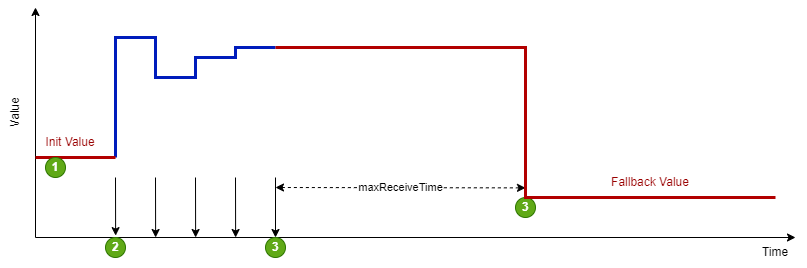
Fig. 10 SGr Stability Fallback
Stabiltiy Fallback Value |
Data Type |
Description |
Example |
|---|---|---|---|
<maxReceiveTime> |
float |
If the device does not receive any communication within this time the device applies the fallback. |
3600.0 s |
<initValue> |
float |
Initial value the device before the communicator sets this value (e.g.at startup, obeginning cycle). |
6.0 A |
<fallbackValue> |
float |
Value the device uses in case of a fallback. |
6.0 A |
Smooth Transition
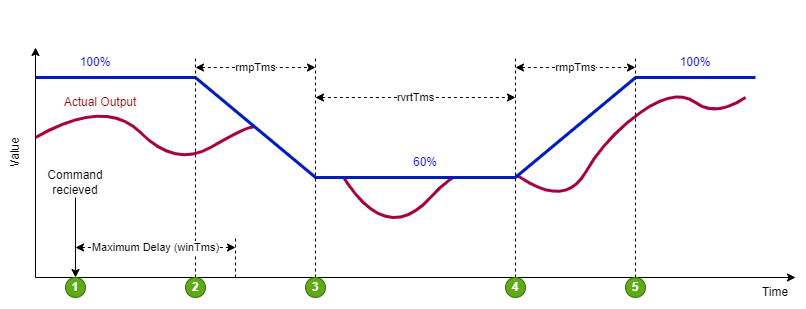
The time behavior of a transition from a power adjustment (positive as well as negative) can be determined by several time values, so that this starts with a random time delay, changes via a ramp and an expiry time with return to the initial value. To avoid return to the initial value the device must either specify the revert time to zero (i.e. no return), or the communicator must repeat the target value before the revert time window expires.
The figure below depicts the typical flow 1. the command for the new target value is received 2. the device randomly starts the ramp, but latest after winTms 3. the ramp reaches the new target value after rmpTms 4. if no new target value is received, the device starts returning to the old target value after rvtTms 5. the ramp reaches the old target value after rmpTms
Smooth Transition Value |
Data Type |
Description |
Example |
|---|---|---|---|
<winTms> |
unsigned long |
indicates a time window in which the new operating mode is started randomly. The time window begins with the start command of the operating mode. The value 0 means immediate. |
300 s |
<rmpTms> |
unsigned long |
Specifies how quickly the changes should be made. The corresponding value is gradually changed from the old to the new value in the specified time. |
450 s |
<rvrtTms> |
unsigned long |
Determines how long the operating mode should be active. When the time has elapsed, the operating mode is automatically terminated. If rvrtTms = 0 (standard value), the operating mode remains active until a new command is received. |
600 s |
Data Point Quality
SGr has attributes to denote the quality of the measured value. The presence of any quality attributes either on functional profile or data point level indicate that the com handler will provide these dynamic attributes at run time (see documentation of SGr com handler libs)
SGrAttribute |
Data Type |
Description |
Example |
|---|---|---|---|
<MeasuredValueSource> |
enum |
Value source kind related to SGr level 6 applications. Potential values are:
|
measuredValue |
Curtailment
Various function profiles require boundaries to set points with respect to curtailment or home energy management systems.
SGr Attribute |
Data Type |
Description |
Example |
|---|---|---|---|
<Curtailment> |
float |
Used in state-based reduction schemes. This value specifies the reduction in percent for the reduced operation mode. |
40% |
<MimimumLoad> |
float |
Used in state-based reduction schemes. In locked mode the product will not reduce its load below this minimum value. |
2 kW |
<MaximumLockTime> |
float |
used in state-based reduction schemes. A reduction command to reduced or locked mode shall not be applied longer than this specified duration. |
20 min |
<MinimumRunTime> |
float |
Used in state-based reduction schemes. When returning to normal mode the normal mode must be guaranteed for at least the specified duration. |
15 min |
<ValueByTimeTable> |
float |
Used for time tables to specify the temporal separation of data curve points |
1 min |
<FlexAssistance> |
<sgr:FlexAssistance> |
Systems with more than One communicator need a definition of the priority of the commands/demands for a flexibility requirement. This element defines the kind of a such a command: |
DSO SHOULD, obligedTo: 3600 sec |
Data Points
A Functional Profile mainly defines a set of Data Points. The Data Points define access points to values that can be read from or written to the product.
The Data Points are defined by the following attributes:
Element |
Description |
|---|---|
Data Point Name |
Name of the Data Point. Should be unique within the functional profile. |
Data Direction |
|
Presence Level |
Data Point availability within an Product that implements the Functional Profile: * Mandatory * Recommended * Optional |
Data Type |
Data type of the Data Point value. (e.g. float32, int, string…) |
Alternative Names |
A list of relevant name spaces list for to display names used in different standards like EEBUS, IEC6850, SAREF4ENER etc. |
Legible Description |
Optional, can occur once per language. Contains details concerning the intended use case of the functional profile. |
If a Data Point is defined as mandatory in the functional profile, it must also be present in the product implementing this functional profile.
If no Data Point is mandatory in the functional profile, then at least one Data Point must be recommended and at least one of the recommended Data Points must be presentin the product implementing this Functional Profile.
Sub Data Points
Data Points that are connected to other Data Points can be modeled as sub Data Points. The connection between Data Point and sub Data Point are defined with naming conventions. If e.g. a Data Point has the name “MainDatapoint” and is connected with a sub Data Point “SubDatapoint” the sub Data Point name has the name “MainDatapoint.SubDatapoint” - this means, the sub Data Point name is appended to the main Data Point name separated with a dot.
An example for a sub Data Point is “Voltage.Precision” as the precision of the Data Point “Voltage”.
SmartGridready Functional Profile Library
The currently published Functional Profiles are available on the SmartGridready Functional Profile Library.
You can add a serach filter by modifying the base URL and adding query parameters. Use the following base URL:
https://library.smartgridready.ch/FunctionalProfileTemplate
and add http query parameters like:
https://library.smartgridready.ch/FunctionalProfileTemplate?level=2m,4m&category=SGCP
Each parameter can contain a comma separated list of filter values:
...&level=2m,4m&...
Available parameters are:
release (aliases: state, releaseState)
level (aliases: levelOfOperation)
category (aliases: functionalProfileCategory)
type (aliases: functionalProfileType)
Defining Functional Profiles
File Naming Scheme
Functional Profiles should have the following file naming convention:
FP_[specificationOwnerIdentification]_[FunctionalProfileCategory]_[FunctionalProfileType]_[levelOfOperation]_[majorVerion].[minorVerion].xml
Writing Descriptions Functional profile descriptions should be structured as follows: * Image indicating the typical use of the functional profile, together with an easily understandable title * Short explanation (i.e. long version of the title) * Detailed explanation, including very attribute. * Description on how to apply the functional profile concerning presence level (i.e. how to handle recommended and optional Data Points)
Functional Profile Release Process
Scope
This document structures the process for the life-cycle of functional profiles.
States
A Functional Profile cycles through the following states:
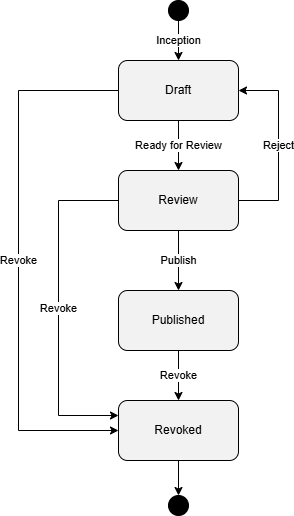
Fig. 11 SGr Functional Profile Process
Action |
Description |
Next Status |
|---|---|---|
Inception |
A demand for a new Functional Profile arises. The new Functional Profile is created in state “Draft” |
Draft |
Ready for Review |
The Functional Profile has been developed and is ready for review by its relevant stakeholders. |
Review |
Publish |
The Functional Profile has passed the review and is ready to be used. |
Published |
Revoke |
A Functional Profile has passed its usefulness and is not needed any more. Any state can be directly revoked. |
Revoked |
Creating new Functional Profiles
If the Functional Profile interest groups sees requirements for a new or improved functionality, it will create a new Functional Profile XML with state “draft”. A new issue will be created for this Functional Profile. The issue has
a self-evident description covering
context in which the need for this Functional Profile has arisen
purpose of this Functional Profile
a label of the Functional Profile interest group concerned
the project “Functional Profile Interest Group” assigned, with status “draft”
Any documentation, discussion, and work on the elaboration of this Functional Profile will be tracked in this github issue.
The team then works directly on the XML.
Ready for review
When a new Functional Profile is considered ready it switches the state to review. The following criteria must be met for this step
Purpose and functionality of the Functional Profile is defined
level of operation is defined
Data points are defined, including mandatory/recommended/optional, units, type and read/write
Generic attributes for the Functional Profile and/or its data points are defined
Publish
To publish a Functional Profile the following criteria must be met:
The version is set correctly according to the versioning scheme (see below).
All stakeholders concerned are happy with the content of the Functional Profile, and have given their formal consent.
“SGr Deklarationsstelle” has been informed about the upcoming publication.
The Functional Profile has been tested by at least one product.
Published Functional Profiles will not change anymore. If a change is requested, a new Functional Profile with increased version number will be created (see versioning scheme below). Therefore, only the release note structure of the Functional Profile can be updated on publishing.
Revoke
If a Functional Profile shall not be used anymore it can be revoked. Only the note structure of the Functional Profile can be updated on publishing.
Revoked Functional Profiles are obsolete and shall not be used for further declarations of products and communicators. However, they will remain the data base for legacy reasons.
Versioning Scheme
Functional Profiles are numbered as follows: primaryVersion.secondaryVersion.subReleasVersionNumber
Number |
Description |
|---|---|
|
Describes the major functionality family. Breaking changes implies an increment of the major number |
|
Describes a backward compatible evolution. Only new functionality is added, but remaining functionality is never changed |
|
The functionality remains identical, but minor non-functional details change, such as descriptions, translations, remarks |
Release Notes
The release notes section contains meta data that describe history and current state of the functional profile.
Element |
Description |
|---|---|
Status |
One of ‘Draft’, ‘Review’, ‘Released’, ‘Revoked’ |
Remarks |
Optional, text with remarks e.g. can be useful during the draft phase for todo’s etc. |
Change Log |
Optional, can occur multiple times. Contains release notes to the version concerned |